MagellanTV Documentaries
- 3.8
- Rating
- 1.00M
- Installs
- Free
- Price

 Analysis by App-foxy
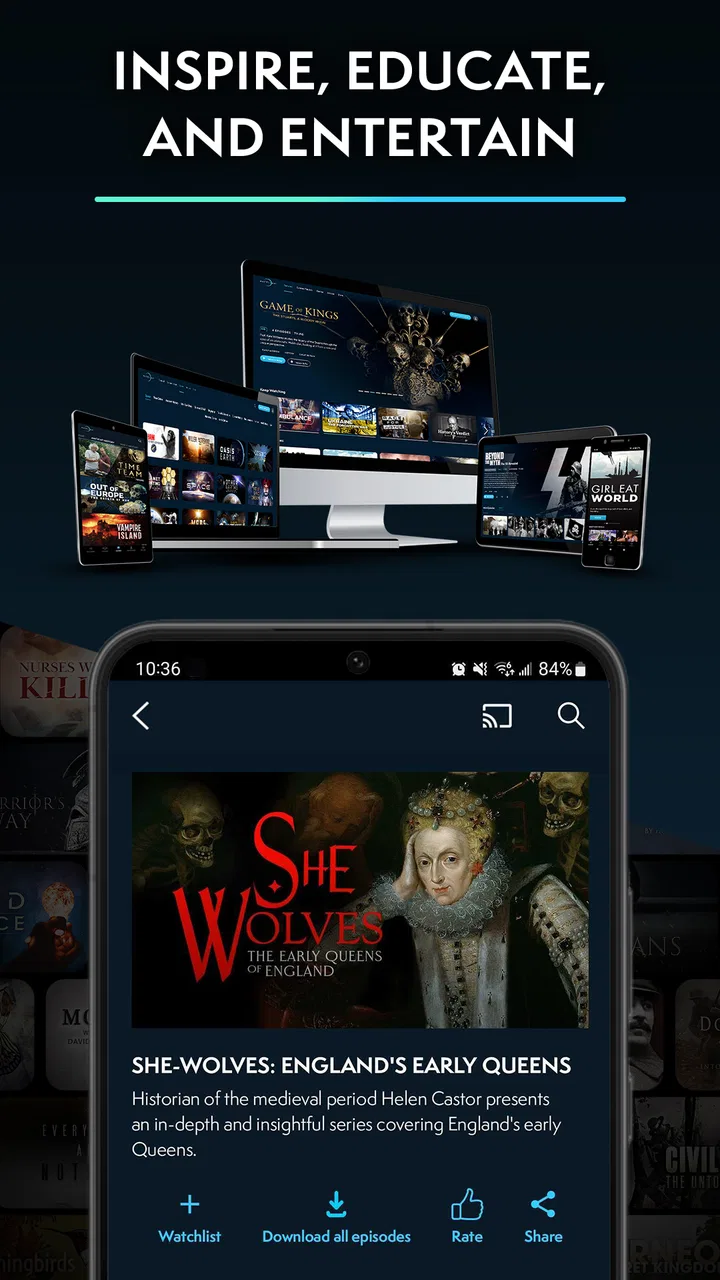
I approached MagellanTV Documentaries as an education app rather than something to leave playing in the background. Developed by MagellanTV Documentaries, it brings history, science, true crime, paranormal subjects and other nonfiction topics into one viewing service. After spending time with it, my main impression is that its value depends less on how many subjects interest you and more on how comfortably you can browse, watch and follow long-form spoken information on your own device.
The app is free to install, with optional in-app purchases ranging from $5.99 to $59.99 per item. It is rated for Everyone 10+, runs on Android 8.1 or later, and has been available since January 18, 2019. Its presence on more than a million devices suggests that it has found a substantial audience, while an average rating of 3.8 from roughly 3,700 ratings shows a more mixed experience than the subject matter alone might suggest.
How comfortably can different people use it?
I find it helpful to think about comfort in practical terms: can I browse without strain, follow the narration, and stop or adjust the session when I need to? Those needs can change from one day to the next, so I’d test the app in the setting where I expect to watch rather than relying on a quick glance at its interface. That makes it easier to decide which viewing habits and device adjustments may help.
You May Also Like

 Blood Strike: 2.5 Anniversary
Blood Strike’s Loadouts Turn Every Drop Into a Tactical Gamble
A close look at Blood Strike’s custom loadouts: how fast access to signature weapons reshapes its battle royale rhythm, rewards preparation, and narrows the gap between fights.

 Pandora - Music & Podcasts
Pandora’s Music Is Easy to Start, but Harder to Recover
Pandora’s strength is its low-effort path from a seed to a station. Its weak spot is how much confidence it asks you to place in connection, setup, and quiet recovery.

 8 Ball Pool
 Is Built on Rivalries, Rematches, and Routine
A close look at the rivalries, rematches, shared routines, and unanswered safety questions that turn a quick pool match into a persistent mobile community.

 Samsung Music
’s Quiet Strength Is Playing What You Already Own
Its reach comes less from spectacle than from dependable access to a personal library. That simplicity is both the app’s strongest retention engine and its ceiling.

 AccuWeather: Weather Radar
AccuWeather Review: A Quick, Clear Forecast for Everyday Decisions
For everyday plans, the best forecast is the one you can understand quickly. AccuWeather makes rain timing, radar, and local conditions easy to act on, with a few trade-offs.

 Hill Climb Racing
Why Hill Climb Racing Still Turns Crashes Into One More Run
A tiny car, a bumpy hill and one more upgrade: Hill Climb Racing keeps resurfacing because its simple chaos makes every near-miss feel personal.
More From Our News Desk



Readability and navigation shape the first impression
For me, the most important part of a documentary app is not the catalogue promise but the route from opening the app to finding something worth watching. MagellanTV works best when I already know the kind of subject I want. Browsing by broad themes such as history, science, true crime or paranormal topics gives the experience a clear starting point, especially for someone who does not want to search through a general video platform filled with unrelated clips.
That structure can also help people who find open-ended services tiring. A large general video platform often mixes educational programs with short videos, adverts, reaction content and recommendations that pull attention in several directions. Here, the documentary focus creates a calmer decision-making framework. I can begin with a subject area, scan the available choices and decide whether I have the concentration for a short session or a deeper watch.
There is a useful distinction between visual clarity and cognitive simplicity. A screen can look clean and still require too much remembering if I open several programs, lose track of what I intended to watch or have to repeatedly inspect descriptions. For viewers with attention difficulties, fatigue or limited working memory, I recommend choosing a subject before browsing rather than opening the app without a plan. A small personal shortlist can make the service feel much less demanding.
Documentary descriptions also deserve more attention than they usually receive. I read them not only to decide whether a topic interests me, but to judge its emotional intensity and information density. A true-crime program may be unsuitable when I want something relaxing, while a science program may demand more sustained concentration than a casual evening allows. This simple check helps me use the catalogue according to my energy level instead of treating every title as interchangeable.
The app is a better fit for readers who can comfortably scan programme names and descriptions. If text on a phone is difficult to read, I would use the device’s own display settings, such as enlarged text or stronger contrast where supported by the operating system. Those adjustments may improve the surrounding interface, but they cannot guarantee that every image, programme card or piece of text will respond perfectly. That is an important practical limitation for anyone relying heavily on visual customization.
I also would not assume that finding a documentary is the same as understanding it. Subject labels help with discovery, but they do not replace a clear explanation of difficulty, pace or emotional tone. I found it useful to treat the first few minutes of a programme as a test: if the narration, editing or terminology feels tiring, switching to another subject is more sensible than forcing myself through it.
Motor and sensory considerations during viewing
Watching a documentary is usually less physically demanding than interacting with a game, but it still involves repeated actions: opening the app, selecting a title, starting playback and adjusting the device. For someone with limited dexterity, tremor or pain, those steps matter. I prefer to prepare the viewing setup first, place the phone or tablet where it will not need constant repositioning, and avoid treating the service as something that requires frequent tapping once the programme begins.
A larger screen can make a meaningful difference. It gives visual elements more room and lets me sit farther away, which may be more comfortable for viewers with eye strain or limited reach. The trade-off is that a larger device is not always easier to hold. A tablet on a stable surface may be more practical than holding a phone for a full documentary, particularly when hand fatigue is an issue.
Audio is central to the experience, so people with hearing loss should think carefully about their preferred way to follow spoken content. I would check whether the particular programme offers captions or subtitles before committing to a long viewing session, rather than assuming every title provides the same support. If captions are available, they can also help when narration is fast, music is prominent or the surrounding room is noisy. If they are not available for a chosen programme, the app becomes much less suitable for someone who depends on text.
For viewers sensitive to sudden sound, tense music or disturbing imagery, the subject categories are useful warnings but not complete protection. Paranormal and true-crime material can contain an atmosphere that is uncomfortable even when the description sounds neutral. I recommend previewing the programme information and watching in a setting where stopping is easy. The service is educational, but educational intent does not automatically make every programme emotionally gentle.
People who are blind or have very limited vision may find the service difficult to judge without testing it with their device’s screen reader and audio controls. The documentary content itself can be valuable because narration carries much of the information, yet browsing still depends on how well labels, controls and programme details are exposed to assistive technology. I would not choose it solely because the programmes are narrated; the accessibility of the app interface is equally important.
Likewise, people who cannot comfortably use touch controls should consider whether their phone or tablet offers an alternative input method that works with the app. External switches, voice control or other system-level tools may help in some situations, but the result can vary by device and operating system. My practical advice is to test the basic path—open the service, select a title and start playback—before paying for anything.
Situational access matters as much as permanent ability
One of the strengths of a documentary service is that it can fit many temporary situations. I can use it when I want a focused lesson at home, a history programme during a quiet break or a science topic when I am tired of fast-moving entertainment. The same content can also work for a family viewing session, provided the chosen subject suits everyone and the age guidance is taken seriously.
Its Everyone 10+ rating makes it more approachable for households than a service built entirely around adult material, but I would still select programmes individually. The rating does not mean every topic will be comfortable for every child, and true crime or paranormal material may need a conversation beforehand. For shared viewing, I prefer history or science as a starting point because those categories are easier to match to different interests and comfort levels.
The app can also be useful for learners who need to pause and revisit an explanation. I often treat a documentary as a starting point rather than a complete lesson: I note an unfamiliar name, stop when a concept becomes dense and return later with a more specific question. That workflow is more effective than trying to remember every detail in one sitting. It also makes the service friendlier to viewers whose concentration varies from day to day.
For people watching in a busy home, the main challenge is interruption. Spoken information is easy to miss when someone is talking nearby, a child needs attention or notifications keep appearing. I would enable the device’s focus or do-not-disturb tools, use headphones if safe and comfortable, and choose shorter viewing periods when the environment is unpredictable. These are not special app features; they are practical ways of making documentary viewing more accessible in real life.
Travel and limited connectivity are another consideration. I would not plan an important educational session around the assumption that every programme will be available in exactly the way I need while away from home. Before travelling, I would open the app, verify that the intended content can be reached and check how playback behaves in the actual conditions I expect to face. This is especially important for learners who cannot easily replace a missed session with another format.
Compared with free video sites, MagellanTV offers a more focused destination for documentary viewing, which can reduce distraction. Compared with a general streaming service, its educational identity is clearer, but the choice may feel narrower if I want films, live television, children’s entertainment and documentaries in one subscription. Compared with books or podcasts, video adds maps, interviews, archival material and visual demonstrations, while reading and audio can be easier to control for some people with visual, hearing or sensory needs.
Where the experience still creates barriers
The biggest barrier is that documentary access is not one single problem. A viewer may be able to browse easily but struggle with small interface text. Another may understand the visuals but miss narration in a noisy room. Someone else may have no difficulty watching but find true-crime themes emotionally overwhelming. MagellanTV can support these viewers only when the device, programme and personal circumstances line up well.
I would also be cautious about the free label. Free installation is useful for trying the service, but optional purchases mean that the complete experience may involve a financial decision. Before entering payment details, I would identify which content I actually want and confirm the cost shown at the moment of purchase. This matters for families, users on tight budgets and anyone who needs to avoid accidental spending.
The rating of 3.8 is a fair reminder not to expect a flawless experience on every phone. With an app used across many devices, playback, navigation and responsiveness can feel different depending on the hardware and system version. I would keep the app updated through the normal app store process, make sure the device has enough free space for smooth operation and test it before relying on it for a planned class or group viewing.
Another limitation is the emotional range of the catalogue. The combination of history, science, true crime and paranormal subjects is appealing, but it is not automatically suitable for winding down, young children or viewers who avoid fear and violence. I would skip the service, or at least choose another type of media, if my priority were gentle family programming, highly interactive learning or a fully text-based study resource.
It is also not the right replacement for a structured course. A documentary can explain a subject clearly, but it may not provide exercises, progress tracking, teacher feedback or a carefully sequenced curriculum. For schoolwork or professional training, I would pair it with a textbook, course platform or reliable reference material. Its strongest role is guided exploration: it helps me become interested, build context and decide what I want to investigate next.
For accessibility, my most useful habit is to test one complete viewing cycle before purchasing: browse, read the description, start the programme, adjust audio or captions if offered, pause, resume and stop playback. That reveals more than a promotional summary. It also gives users with specific needs a chance to discover whether the controls, text and sensory presentation work for them personally.
My inclusive verdict
I see MagellanTV Documentaries as a worthwhile education app for people who enjoy learning through professionally presented nonfiction and want a more focused alternative to general video browsing. I especially recommend it to curious adults, older children choosing age-appropriate subjects with guidance, and viewers who like moving between history, science and unusual real-world stories without opening several unrelated services.
Its strongest accessibility advantage is the flexibility of documentary viewing itself: I can choose a subject that matches my energy, pause when information becomes dense and use a larger screen or supportive device settings to make the session more comfortable. Those choices will not solve every interface or sensory issue, but they make the service adaptable in ordinary home situations.
I would be more hesitant to recommend it to someone who depends on captions for every programme, needs a highly structured course, cannot tolerate disturbing themes or has difficulty with touch-based browsing unless their device’s assistive tools work smoothly with the app. In those cases, a caption-first video service, audiobook platform, accessible digital library or formal learning system may be a better primary option.
The free starting point makes trying it sensible, while the in-app purchase range means I would make the payment decision only after checking a few programmes and confirming that the viewing experience meets my needs. With more than a million installs and hundreds of written reviews, it is clearly an established choice, but the middling average rating reinforces my view that personal device compatibility matters.
My final recommendation is conditional but positive: try it when you want concentrated documentary viewing, approach the categories thoughtfully, and test the controls before committing money or planning an important group session. MagellanTV is most successful when treated as a flexible window into nonfiction—not as a universal accessibility solution or a replacement for every other way of learning.
FAQs for MagellanTV Documentaries
01What is MagellanTV Documentaries?
MagellanTV Documentaries is a streaming app focused on factual programming, including history, science, nature, true crime, ancient civilizations, biographies, and technology. Its catalog is designed for viewers who prefer educational and documentary content rather than general entertainment. After opening the app, users can browse categories, search for specific subjects, review titles, and start watching supported documentaries on a compatible device.
02Does MagellanTV Documentaries require a subscription?
MagellanTV Documentaries generally operates as a subscription-based streaming service, so full access to its catalog normally requires a paid membership. Availability of free trials, introductory offers, billing options, and subscription prices can vary by country, platform, and promotion. Before downloading or subscribing, check the current in-app or official store information carefully, especially the renewal terms and cancellation requirements.
03Can I watch MagellanTV Documentaries offline?
Offline viewing may be available for selected content and supported devices, but it should not be assumed that every documentary can be downloaded. The option depends on the app version, licensing restrictions, subscription plan, and operating system. If offline access is important to you, open a documentary’s details page and look for a download option before traveling or watching without a reliable internet connection.
04What kind of documentaries are available on MagellanTV?
The service is aimed at viewers who enjoy serious, information-rich programming across a broad range of subjects. Its selection commonly includes historical events, archaeology, military history, science, wildlife, space, crime investigations, culture, and notable people. The exact catalog changes over time and can differ by region, but the overall focus remains documentary storytelling rather than scripted movies or television series.
05Is MagellanTV Documentaries suitable for families and children?
MagellanTV includes educational subjects that may be appropriate for older children and teenagers, but it is not exclusively a children’s streaming service. Some programs can contain disturbing historical events, crime details, violence, mature themes, or strong imagery. Parents should review the description, age rating, and subject matter of each title before allowing younger viewers to watch, particularly in the true-crime and war categories.
Pros
- Focused catalog of high-quality documentaries across history
- science
- and true crime.
- Ad-free viewing provides a cleaner experience without commercial interruptions.
- Offline downloads make selected documentaries available for travel or weak connections.
- Multiple profiles help household members keep separate recommendations and watchlists.
- Subtitles and audio options improve accessibility for many international viewers.
Cons
- The catalog may feel smaller than those of major all-purpose streaming services.
- Some titles or features can vary by country due to licensing restrictions.
- A subscription is required for full access beyond the available trial or free content.
- New releases may arrive less frequently than on larger entertainment platforms.
- Video quality and playback can depend heavily on your internet connection and device.

MagellanTV Documentaries
Gallery